---
title: How to see Plans & Specs?
description: We provide Plans & Specs for as many projects as possible, and sometimes, we can find them upon request.
---
[Skip to content](https://info.buildcentral.com/helpcenter/how-to-see-plans-and-specs#main-content)
English
Show submenu for translations
![Interim logo - BuildCentral - MONO WHT.png\]](https://info.buildcentral.com/hs-fs/hubfs/Interim%20logo%20-%20BuildCentral%20-%20MONO%20WHT.png?height=40&name=Interim%20logo%20-%20BuildCentral%20-%20MONO%20WHT.png)
Open main navigation
Close main navigation
- English
Show submenu for translations
- Go to buildcentral.com
Go to buildcentral.com
Hey there! How can we help?
- There are no suggestions because the search field is empty.
1. [ConstructionWire Help Center](https://info.buildcentral.com/helpcenter?hsLang=en)
2. [How-Tos](https://info.buildcentral.com/helpcenter/how-tos?hsLang=en)
3. [Product Features](https://info.buildcentral.com/helpcenter/how-tos?hsLang=en#product-features)
# How to see Plans & Specs?
## We provide Plans & Specs for as many projects as possible, and sometimes, we can find them upon request.
We provide Plans & Specs for all projects for which we can find and verify such information. Let's show you how to access them.
*Disclaimer: We are still developing our functionality to see all projects for which plans and specs are available. In the meantime, we encourage you either to view Recent Plans/Specs or to search within Plans & Specs using Keyword search.*
**Skip to:**
- [Step 1: Login](https://info.buildcentral.com/helpcenter/how-to-see-plans-and-specs#login)
- [Step 2: Choose your database](https://info.buildcentral.com/helpcenter/how-to-see-plans-and-specs#chooseyourdatabase)
- [Step 3a: Recent Plans & Specs](https://info.buildcentral.com/helpcenter/how-to-see-plans-and-specs#Step3a)
- [Step 3b: Plans & Specs via Keyword Search](https://info.buildcentral.com/helpcenter/how-to-see-plans-and-specs#Step3b)
- [Step 4: View and download Plans & Specs](https://info.buildcentral.com/helpcenter/how-to-see-plans-and-specs#viewanddownload)
### Step 1: Login
Start by [logging into your BuildCentral portal](https://www.constructionwire.com/Login) by clicking the link or pasting the following URL into your browser: [https://www.constructionwire.com/Login](https://www.constructionwire.com/Login). You should arrive at this page:
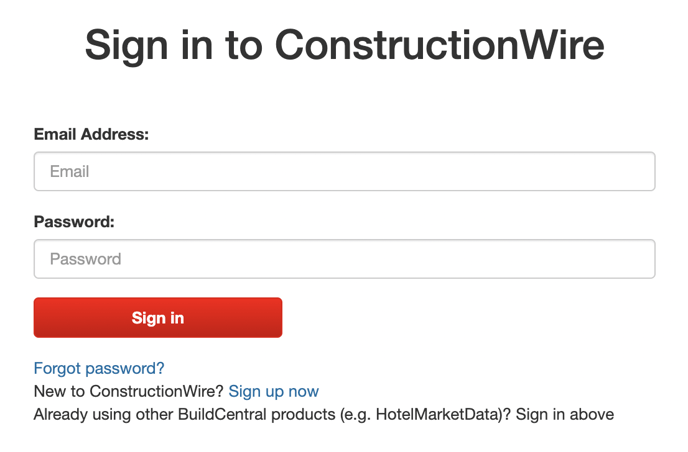
If your subscription is to a product other than ConstructionWire, no worries — you'll still log in here.
### Step 2: Choose your database
If you're subscribed to multiple BuildCentral products, you'll want to choose the one that applies for the project(s) in which you're interested. That means navigating between the tabs shown in the screenshot below:
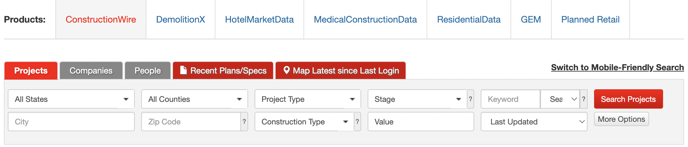
For the purposes of this walkthrough, we'll stick with **ConstructionWire**.
Now, we get to a bit of a crossroads. Click on the anchor link that most closely applies to you:
- [Step 3a: I'm looking for recently added and/or updated projects for which Plans & Specs are available](https://info.buildcentral.com/helpcenter/how-to-see-plans-and-specs#Step3a)
- [Step 3b: I'm searching for keywords within available Plans & Specs](https://info.buildcentral.com/helpcenter/how-to-see-plans-and-specs#Step3b)
### Step 3a: Recent Plans & Specs
If you're simply looking to check on newly added and/or updated projects for which Plans & Specs are already included in their projects, reports, just click the red **Recent Plans/Specs** tab above the search panel, as shown here:
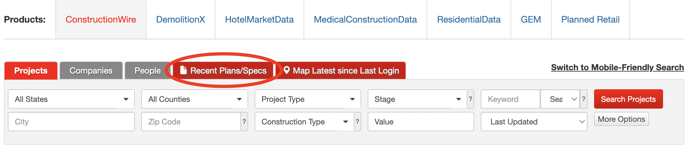
Alternatively, if the word "Recent" seems (or proves) too much of a constraint for your interests, simply proceed to Step 3b.
### Step 3b: Plans & Specs via Keyword Search
Hey again! As we note in the disclaimer at the top of this article, we're still working on rolling out functionality to search for all projects for which Plans & Specs are available. For now, though, we've got a workaround!
From the Search panel, you'll want to click the gray **More Options** button. If you think you'd benefit from an introduction (or a refresher), feel free to check out our [Introduction to BuildCentral project search](https://info.buildcentral.com/helpcenter/introduction-to-buildcentral-project-search?hsLang=en) article.

From there, locate the **Keywords** header at the bottom-left of the More Options pop-up. The bottom text-entry box has "Plans/Specs" grayed out as preview content. In that box, search for keywords that will appear within Plans & Specs applicable to you and your business.

For example, to search for a project's electrical schedule or schematics, you might type "Division 26" or "electrical." You might search for specified products: "light fixture." Alternatively, if you're looking for projects in need of your flooring services, what might you search? You guessed it: "flooring." Pretty straightforward. Once you've got your keywords, click the red **Search** button.
*Remember, if you've found a project that piques your interest, but it doesn't have Plans & Specs, you can use our [Custom Q&A feature](https://info.buildcentral.com/helpcenter/how-to-use-custom-qa?hsLang=en) to ask up to five (5) customized questions per month about any project you find. Our researchers typically respond within one business day.*
### Step 4: View and download Plans & Specs
Now that you've got some search results, choose a project report. You'll notice that projects with Plans & Specs have a light blue **Documents** tag, as shown below.
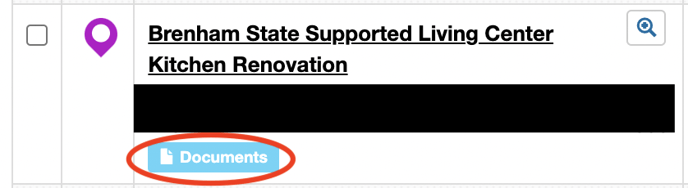
Click either **Documents** or the project title to access the project report, where you'll see a **Plans and Specs** header with linked documents:

And voilà! That's how to use Plans & Specs.
- [FAQs](https://info.buildcentral.com/helpcenter/faqs?hsLang=en#main-content)
- [ConstructionWire](https://info.buildcentral.com/helpcenter/faqs?hsLang=en#constructionwire)
- [HotelMarketData](https://info.buildcentral.com/helpcenter/faqs?hsLang=en#hotelmarketdata)
- [PlannedRetail](https://info.buildcentral.com/helpcenter/faqs?hsLang=en#plannedretail)
- [ResidentialData](https://info.buildcentral.com/helpcenter/faqs?hsLang=en#residentialdata)
- [Company FAQ](https://info.buildcentral.com/helpcenter/faqs?hsLang=en#company-faq)
- [Product Features](https://info.buildcentral.com/helpcenter/faqs?hsLang=en#product-features)
- [Subscription Features](https://info.buildcentral.com/helpcenter/faqs?hsLang=en#subscription-features)
- [How-Tos](https://info.buildcentral.com/helpcenter/how-tos?hsLang=en#main-content)
- [Product Features](https://info.buildcentral.com/helpcenter/how-tos?hsLang=en#product-features)
- [Advanced Training Session Recordings](https://info.buildcentral.com/helpcenter/how-tos?hsLang=en#advanced-training-session-recordings)
- [HotelMarketData](https://info.buildcentral.com/helpcenter/how-tos?hsLang=en#hotelmarketdata)
- [MedicalConstructionData](https://info.buildcentral.com/helpcenter/how-tos?hsLang=en#medicalconstructiondata)
- [ResidentialData](https://info.buildcentral.com/helpcenter/how-tos?hsLang=en#residentialdata)
- [Manage My Account](https://info.buildcentral.com/helpcenter/manage-my-account?hsLang=en)
[](https://buildcentral.com)
BuildCentral Help Center
Copyright © 2026, Hubexo North America
```json
{
"@context" : "https://schema.org",
"@type" : "VideoObject",
"caption" : {
"@type" : "MediaObject",
"contentUrl" : "https://info.buildcentral.com/media-transcripts/112567532665/en.vtt",
"inLanguage" : "en",
"name" : "en Captions"
},
"contentUrl" : "https://6391927.fs1.hubspotusercontent-na1.net/hubfs/6391927/BuildCentral%20How%20to%20See%20Plans%20&%20Specs.mp4",
"dateModified" : "2025-11-15T01:56:10.961Z",
"duration" : "PT1M0.06S",
"height" : 1080,
"name" : "BuildCentral How to See Plans & Specs",
"thumbnailUrl" : "https://6391927.fs1.hubspotusercontent-na1.net/hubfs/6391927/BuildCentral%20How%20to%20See%20Plans%20&%20Specs.mp4/medium.jpg",
"uploadDate" : "2023-04-24T14:19:10.582Z",
"width" : 1920
}
```